M2M - Cluster Topology modified
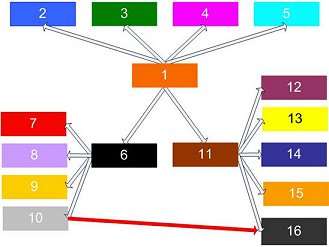
Using route mode direct with the appropriate topology helps to accomplish this goal because it is the most efficient routing method since it will reduce network traffic and master processing of messages. The figure below uses the Cluster concept and direct mode to link specific masters, yet remain isolated from other masters on the network:
The URL Lists would be configured like this:
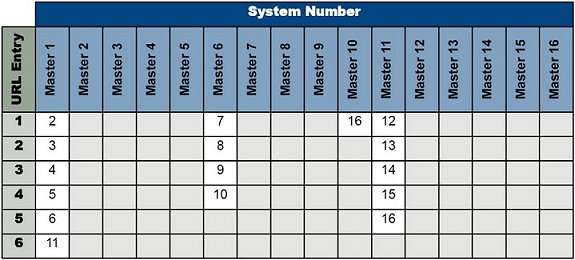
Note: The system number is being used here for readability, the actual URL/IP address must be entered into the URL List.
Although this topology looks similar to the Cluster topology, by using route mode the communication connections are very specific. Masters will only be able to communicate with masters that have an arrow between them.
For example:
- The master with system 1 will only be able to communicate with masters 2, 3, 4, 5, 6, and 11, but will not connect with masters 7, 8, 9, 10, 12, 13, 14, 15, and 16.
- The connection, indicated with the red arrow, between master 10 and master 16 may appear to create a routing loop, but since the masters are configured to use route mode direct a loop is avoided.
- Master 10 will only be able to connect with masters 6 and 16.
Note:
When multiple masters exist within a large NetLinx installation the significance of the System number component cannot be over emphasized.
Out of habit it is easy to ignore the system field within NetLinx Studio because its value has not meant anything in standalone systems. A significant source of technical support phone calls will be directly related to invalid or unintentionally incorrect settings of the system number, URL List, or route mode.
When NetLinx Studio connects to a single master, yet allows the user to access all other system masters it is inevitable that some confusion will occur.
Therefore, it is a good idea to document each master’s system number and the topology of the interconnections!